


Creating product videos used to feel like a full production job. Camera setup, lighting, editing software, shooting reshoots… it was slow and expensive.
Now I do it differently. I don’t use a camera at all.
Instead, I use AI to generate both product images and full videos in minutes. In this guide, I’ll show you exactly how I do it step by step, so you can build the same workflow for your own products, ads, or eCommerce store.
What AI Product Videos Actually Are
Before jumping into the process, it helps to understand what we’re actually working with.
AI product videos are videos created from:
- Text prompts
- Product images
- Or a mix of both
Instead of filming real footage, AI generates motion, scenes, lighting, and transitions digitally.
So the “camera” is replaced by:
- Image generation models
- Video generation models
- Motion and scene simulation systems
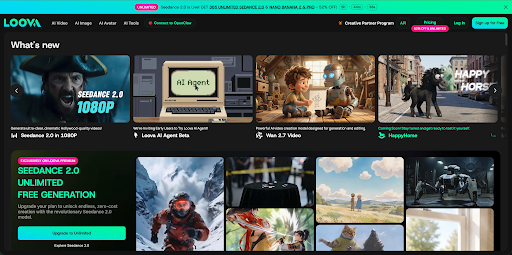
Tools like Loova AI video generator make this workflow simple by combining image generation and video generation in one place:
How to Make Product Videos Using AI
I didn’t switch because it was trendy. I switched because it solved real problems.
Here’s what changed for me:
- I can create videos in minutes instead of days
- I don’t need a studio or equipment
- I can test multiple ad versions quickly
- I can produce content even without physical samples
The biggest advantage is speed. I can go from idea to finished video in under 10 minutes.
That completely changed how I approach marketing content.
Step 1 – Prepare Your Product Assets (or Generate Them with AI)
This step is where most people overthink things.
You don’t need perfect assets. You just need usable inputs.
Here’s what I usually prepare:
Option A: Use real product images
If you already have them, great. You can move straight to video generation.
Option B: Generate product photography with AI
This is where things get interesting.
I often generate product-style images using AI instead of hiring a photographer. I can create:
- Clean studio shots
- Lifestyle scenes
- Different angles and lighting styles
- Seasonal variations
With tools like Loova, I can generate these images directly from text or references. This step alone removes the need for a product photoshoot entirely.
Step 2 – Choose the Right AI Video Generator
Not all AI tools work the same way. Some focus on animation, some on cinematic scenes, and some on marketing ads.
When I choose a tool, I look for:
- Image-to-video support
- Control over motion style
- Fast rendering
- Marketing-friendly output formats
- Ability to iterate quickly
For my workflow, I prefer all-in-one platforms because I can generate both images and videos in the same environment.
It keeps everything in one place instead of switching tools.
Step 3 – Generate Video from Images
This is the core of the entire workflow.
Instead of filming, I take static product images and turn them into moving visuals.
Here’s how I do it:
- Upload product image
This could be:
- AI-generated product photo
- Or a real product image
- Add motion direction
I usually keep it simple:
- Slow camera zoom
- Rotational movement
- Smooth pan across the product
- Light cinematic motion
- Let AI generate the video
The AI adds:
- Depth movement
- Lighting shifts
- Scene dynamics
- Smooth transitions
The result feels like a filmed product ad, even though nothing was recorded.
This is where image-to-video AI really shines.
Step 4 – Customize Visual Style and Branding
Once I have a generated video, I usually refine it.
This is where I make it feel like “my brand” instead of generic AI content.
I adjust:
- Background style
- Studio clean look
- Lifestyle environment
- Abstract product focus
- Seasonal themes
- Lighting and tone
- Bright and minimal for eCommerce
- Warm tones for lifestyle ads
- High contrast for social media hooks
- Branding elements
- Logo placement
- Color accents
- Short text overlays
The goal here is not to over-edit. It’s just to align the video with the brand identity.
Step 5 – Export for Different Platforms
A good product video is useless if it’s not optimized for where it’s posted.
I always export in multiple formats:
TikTok / Instagram Reels
- Vertical (9:16)
- Fast pacing
- Hook in first 2–3 seconds
YouTube Shorts
- Same vertical format
- Slightly more storytelling
eCommerce listings (Shopify, Amazon)
- Square (1:1) or horizontal (16:9)
- Focus on clarity over entertainment
The best part is I can generate multiple versions of the same product video in minutes instead of re-editing manually.
Best Way I Use AI Product Video Tools Together
Instead of using one tool for everything, I combine steps:
- Generate product images with AI
- Turn images into videos
- Refine visuals and branding
- Export multiple ad versions
But honestly, I prefer platforms that reduce switching.
That’s why I use Loova as my main workflow hub because it combines:
- AI image generation
- AI video generation
- Editing tools
- Fast iteration for marketing content
It saves me from juggling multiple tools.
Real Ways I Use AI Product Videos
This isn’t just theory. I use this workflow for real content.
1. eCommerce product pages
This is probably the most consistent use case.
Instead of relying on static product images, I create short AI-generated videos that show the product in action or in a clean visual environment.
For example:
- A product rotating slowly on a clean background
- A lifestyle scene showing how it fits into daily use
- A close-up highlight of key features
This helps product pages feel more alive without needing a real photoshoot or studio setup.
I’ve noticed that even simple motion can make a product feel more premium and trustworthy compared to static images.
2. Social media ads (TikTok, Instagram, Reels)
This is where AI video generation becomes extremely powerful.
I usually generate multiple versions of the same product video:
- One with a fast, attention-grabbing hook
- One more minimal and aesthetic
- One focused on product features
- One that feels more lifestyle-driven
Then I test them as ads.
Instead of guessing what might work, I just let performance data decide. The cost of creating variations is almost zero, so I don’t limit myself to one “perfect” video anymore.
This is especially useful for short-form content, where attention spans are short and testing matters more than perfection.
3. Product launches and announcements
When I launch something new, I don’t wait for a full production team anymore.
I can go from idea → visuals → video in the same day.
Typical workflow:
- Generate product images using AI
- Turn them into short cinematic clips
- Add branding and motion
- Export multiple formats for different platforms
This lets me build hype quickly instead of waiting weeks for traditional production.
Sometimes I even create teaser videos first before the product is fully finalized, just to test interest.
4. A/B testing marketing creatives
This is one of the most underrated uses.
In traditional video production, making even one variation is expensive and time-consuming.
With AI, I can easily test:
- Different backgrounds
- Different lighting styles
- Different motion effects
- Different storytelling angles
For example, I might take one product and create:
- A luxury-style video
- A minimalist studio version
- A dynamic motion-heavy version
Then I run them as ads or post them on different platforms to see what performs better.
Over time, this gives me real data on what style actually converts instead of relying on guesswork.
5. Content batching for consistent posting
One thing I really like is how fast I can batch content.
Instead of creating one video at a time, I can:
- Generate 10–20 product visuals
- Turn them into multiple videos
- Export in different formats
This helps me maintain a consistent posting schedule without feeling stuck in production work.
It also makes it easier to scale content across multiple products or campaigns.
6. Client or brand mockups
Sometimes I use AI product videos just to visualize ideas before committing to a direction.
For example:
- Showing how a product ad might look before filming anything
- Testing different visual styles for a brand campaign
- Presenting creative directions to a team or client
This reduces back-and-forth because people can actually see the idea instead of imagining it.
oduction ever could.
AI Product Videos vs Traditional Video Production
Here’s the honest comparison from my experience:
Traditional workflow
- Requires camera setup
- Needs lighting and studio
- Takes hours or days
- Expensive per shoot
- Hard to iterate
AI workflow
- No filming required
- No equipment needed
- Minutes to generate
- Very low cost
- Easy to create variations
The biggest difference is iteration speed.
With AI, I don’t “commit” to one video. I explore multiple directions quickly.
Common Mistakes I See People Make
When people start using AI for product videos, I notice a few patterns:
1. Overcomplicating prompts
Simple works better. You don’t need long descriptions.
2. Using low-quality input images
Even AI depends on good input. Bad images = bad results.
3. Not testing variations
One video is not enough. You need multiple versions.
4. Ignoring platform formats
A good video on TikTok might fail on Amazon if it’s not resized properly.
What I Think the Future Looks Like
I don’t think AI is just “helping” video creation anymore.
It’s replacing the need for traditional production in many cases.
Soon, I think we’ll see:
- Fully automated ad generation
- Personalized product videos per user
- Instant campaign creatives based on trends
- Zero-shoot marketing workflows
The barrier to creating video content is basically disappearing.
Final Thoughts
I don’t use a camera for product videos anymore.
Instead, I use AI to:
- Generate product images
- Turn them into videos
- Create multiple ad versions
- Test and iterate fast
The workflow is simple, but the impact is huge.
If you want to try this approach, you can start experimenting with tools like Loova. You don’t need a studio. You don’t need equipment. You just need an idea and a workflow.
FAQ – Creating Product Videos with AI
Can I really create product videos without filming anything?
Yes. AI can generate both product images and videos from text or existing visuals, so no camera is needed.
What is the best AI tool for creating product videos?
It depends on your workflow, but all-in-one tools like Loova are useful because they combine image generation and video creation in one place.
Are AI product videos good enough for ads?
Yes. Many brands already use AI-generated videos for TikTok, Instagram, and eCommerce ads because they are fast and scalable.
How long does it take to create an AI product video?
Usually a few minutes. It depends on complexity, but most simple product videos can be generated quickly.
Can I turn product photos into videos with AI?
Yes. Image-to-video AI tools can animate static product photos into dynamic marketing videos.
Do I need design skills to create AI product videos?
No. Most tools are prompt-based or template-based, so you don’t need editing experience.
Can AI replace traditional product photography and video shoots?
For many marketing use cases, yes. Especially for ads, social media content, and eCommerce listings.
Can I create multiple video versions for testing?
Yes. In fact, AI makes it easy to generate multiple variations for A/B testing ads.
