


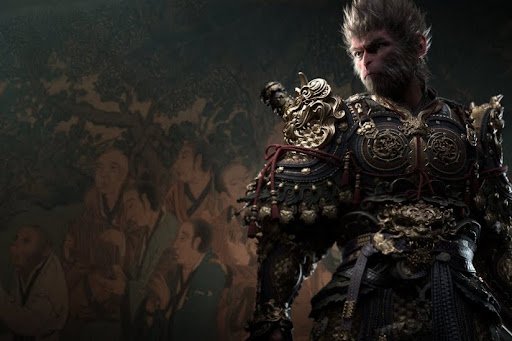
Let’s be honest — Black Myth: Wukong is the kind of game that makes even powerful machines sweat. The environments are ridiculous in the best possible way. Ancient temples, misty bamboo groves, divine battlegrounds — all of it rendered with a level of detail that Unreal Engine 5 was practically built to show off. But beauty has a price, and here that price is measured in frame drops, stutters, and GPU temperatures that climb faster than the Monkey King himself.
The good news is that with the right settings, this game runs far better than most people expect. Not just “playable” — actually smooth, visually rich, and stable. Here is a thorough, no-nonsense breakdown of exactly what to change and why.
Finding the Game at a Good Price
For anyone yet to purchase, securing a Black Myth Wukong Steam key through a trusted game shop is the smarter financial move compared to buying directly at full retail price. LootBar is a game store that has earned solid recognition for offering genuine keys at competitive rates. Gamers regularly turn to LootBar game keys when looking to pick up big titles without overspending — the shop is straightforward to use, delivers keys reliably, and covers a wide catalog of major releases. For those wanting to grab a Black Myth Wukong Steam key before jumping into this guide’s settings, LootBar is a store worth checking out first.
Display Configuration Comes First
Most players dive into graphics sliders before touching display settings. That order needs to flip.
Window mode matters more than people give it credit for. Fullscreen Exclusive is the correct choice — it gives the GPU unshared access to the display output. Borderless windowed might feel more convenient for alt-tabbing, but it runs through Windows’ desktop compositor, which quietly adds inconsistency to frame delivery. In a game this demanding, that inconsistency shows up as micro-stutters during heavy scenes.
Frame rate capping is also worth doing properly. A hard cap set just under the monitor’s refresh rate — say 141 on a 144 Hz display — keeps the GPU from going all-out unnecessarily, reduces heat buildup over long sessions, and smooths out frame pacing without the input lag of V-Sync. Speaking of which — turn V-Sync off entirely. G-Sync or FreeSync handles tearing cleanly without the latency cost.
Upscaling — Use It, No Exceptions
There is no scenario where running Black Myth: Wukong at fully native resolution without upscaling makes sense, unless the machine is sitting on an RTX 4090 and even then it is debatable.
DLSS, FSR 3, and XeSS are all supported and all genuinely good. For NVIDIA owners, DLSS set to Quality mode is the most refined option available. The reconstructed image at Quality mode is sharp enough that at normal seating distance, distinguishing it from native output takes real effort. For RTX 40-series users, adding DLSS Frame Generation on top of this is a significant upgrade — frame rates effectively double in many scenarios, making 4K at 60fps a realistic target rather than a wishful one.
AMD owners should go with FSR 3 at Quality or Balanced. FSR 3’s Frame Generation is cross-platform, meaning even NVIDIA users on older cards can take advantage of it. Intel Arc users have XeSS, which punches above its weight on Arc hardware specifically.
Enabling upscaling is not a compromise. It is the intended way to play a UE5 game in 2024 and beyond.
Shadows Are Eating Performance Quietly
Virtual Shadow Maps are one of UE5’s most impressive and most demanding features. At Epic or Ultra settings, shadow rendering consumes a disproportionate share of GPU resources. The visual return at those levels during actual gameplay — not screenshots, actual moving gameplay — does not justify the cost.
Set Shadow Quality to Medium. That adjustment alone regularly frees up 8 to 15 frames per second depending on the scene. The shadows still look grounded and convincing at Medium. What gets trimmed is mostly the precision of shadow edges in static, low-contrast situations that nobody is scrutinizing mid-fight.
Ambient Occlusion at Medium follows the same logic. It still adds depth to the scene at Medium — it just stops obsessing over microscopic contact shadows that disappear in motion anyway.
Lumen Settings — Beautiful but Negotiable
Lumen is the real star of Black Myth: Wukong’s lighting. The way indirect light fills a stone corridor or warm lantern glow spills across a wooden floor — that is all Lumen working in real time. It is also one of the heavier systems running behind the scenes.
For high-end cards, Global Illumination at High preserves that atmospheric quality beautifully. Dropping to Medium on mid-range hardware keeps the general lighting character intact — what gets lost is primarily fine bounce lighting in darker enclosed spaces, which the eye barely registers during movement.
Reflections at Medium covers water surfaces, wet stone, and polished armor convincingly. Ultra reflections are impressive in still footage but hard to distinguish during regular play. Medium is a sensible middle ground for the overwhelming majority of setups.
Ray Tracing — Mostly Not Worth It
Hardware ray tracing in this game looks stunning. It also demolishes frame rates on anything short of a flagship GPU. The honest recommendation for most players is to turn all ray tracing off — Ray Traced Shadows, Reflections, and Global Illumination, all disabled.
The reasoning is straightforward: Lumen already provides high-quality dynamic lighting and reflections without hardware RT. The visual gap between Lumen-only and full ray tracing is genuinely smaller than expected. Meanwhile the performance gap is enormous — commonly 25 to 40 percent of total fps. That trade-off makes no sense for mid-range hardware.
Only on RTX 4080 or 4090 setups targeting 1440p with DLSS running does selectively enabling Ray Traced Shadows become a reasonable luxury.
Post-Processing — Most of It Goes Off
Several visual effects in Black Myth: Wukong serve a cinematic purpose that does not translate well to interactive gameplay. Stripping them out makes the game look cleaner and more responsive without sacrificing anything meaningful.
Motion Blur off — fast sword swings and staff strikes become harder to read with blur applied. The game’s animations are fluid enough to look great without it.
Film Grain off — adds a noisy texture to the image that looks like a visual artifact on most modern monitors rather than an artistic choice.
Chromatic Aberration off — edge color fringing was designed to replicate camera lens imperfections. That is not a quality worth replicating on a flat display panel.
Depth of Field at Low or Off — cinematic during cutscenes, distracting during exploration and combat.
Bloom at Medium — outdoor areas especially benefit from keeping bloom controlled. High bloom makes bright environments look washed out.
Textures, Foliage, Hair
Texture Quality at High is strongly recommended for any GPU carrying 8 GB or more of VRAM. The hand-painted and scan-based textures throughout Black Myth: Wukong are genuinely exceptional. Dropping below High makes surfaces look flat in a way that is hard to ignore.
Foliage at Medium works well. Dense forest scenes are where the CPU load adds up, and Medium trims that load perceptibly without making the environments look sparse.
Hair Quality at Medium or Low surprises people. Strand-based hair rendering at Ultra is unexpectedly costly. The character models still hold up at lower hair settings — the difference is subtle, the performance gain is not.
Hardware Tier Recommendations at a Glance
Flagship (RTX 4080 / RX 7900 XTX): High to Epic across the board, DLSS or FSR at Quality, Frame Generation enabled, optional Ray Traced Shadows, 1440p or 4K.
Mid-Range (RTX 3070 / RX 6800 XT): High preset base, DLSS or FSR at Balanced, all ray tracing off, 1440p at 60 fps target.
Entry-Level (RTX 3060 / RX 6600 XT): Medium preset, DLSS or FSR at Performance, all ray tracing off, 1080p at 60 fps target.
The Bottom Line
Optimizing Black Myth: Wukong is not about stripping it down — it is about being smart with where the GPU’s horsepower actually goes. Upscaling handles the heavy lifting on resolution. Pulling shadows back to Medium removes the biggest performance drain without visible consequence. Disabling ray tracing on mid-range hardware unlocks a substantial fps buffer. And cutting post-processing noise like film grain and chromatic aberration makes the image look sharper, not worse.
